Turnitin Feedback Studio is a comprehensive tool that helps students and instructors assess and improve written work. It provides originality reports to detect plagiarism and highlights text matches from various sources. Instructors can offer detailed feedback through inline comments and voice notes, while also using rubrics for structured grading.
Assignments must be created as TurnitIn assignments in Canvas and not past due in order to run the paper through the TurnitIn Feedback Studio.
TurnItIn is integrated into Canvas and gives faculty the ability to seamlessly check plagiarism in their student's work. Please see the video below on how to create a TurnItIn assignment within Canvas.
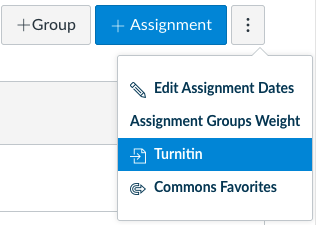
NOTE: To create a TurnItIn assignment, you must create your assignment through the 3 dots menu (pictured below). The feature cannot be retroactively added onto a default Canvas Assignment.
1) Click on the Turnitin Assignment in Canvas

2) To view a paper, click on the Student's submitted file

3) The Similarity Report will now open up in a new window. From here you can see the report and add student feedback.

Some unusual cases may require the instructor to submit on behalf of a student. Please see TurnItIn's directions here on Submitting or Resubmitting on Behalf of a Student.